UPLOAD, CONVERT, SEND
A-Cube Transfer
With A-Cube Transfer, sending and receiving electronic documents has never been easier — no integration required. Export files directly from your ERP and upload them to A-Cube Transfer. Our service automatically extracts the information needed to generate a compliant digital document — whether an e-invoice, delivery note, electronic order, or electronic receipt — and transmits it to the relevant tax authority.

HOW IT WORKS
Upload, convert, send
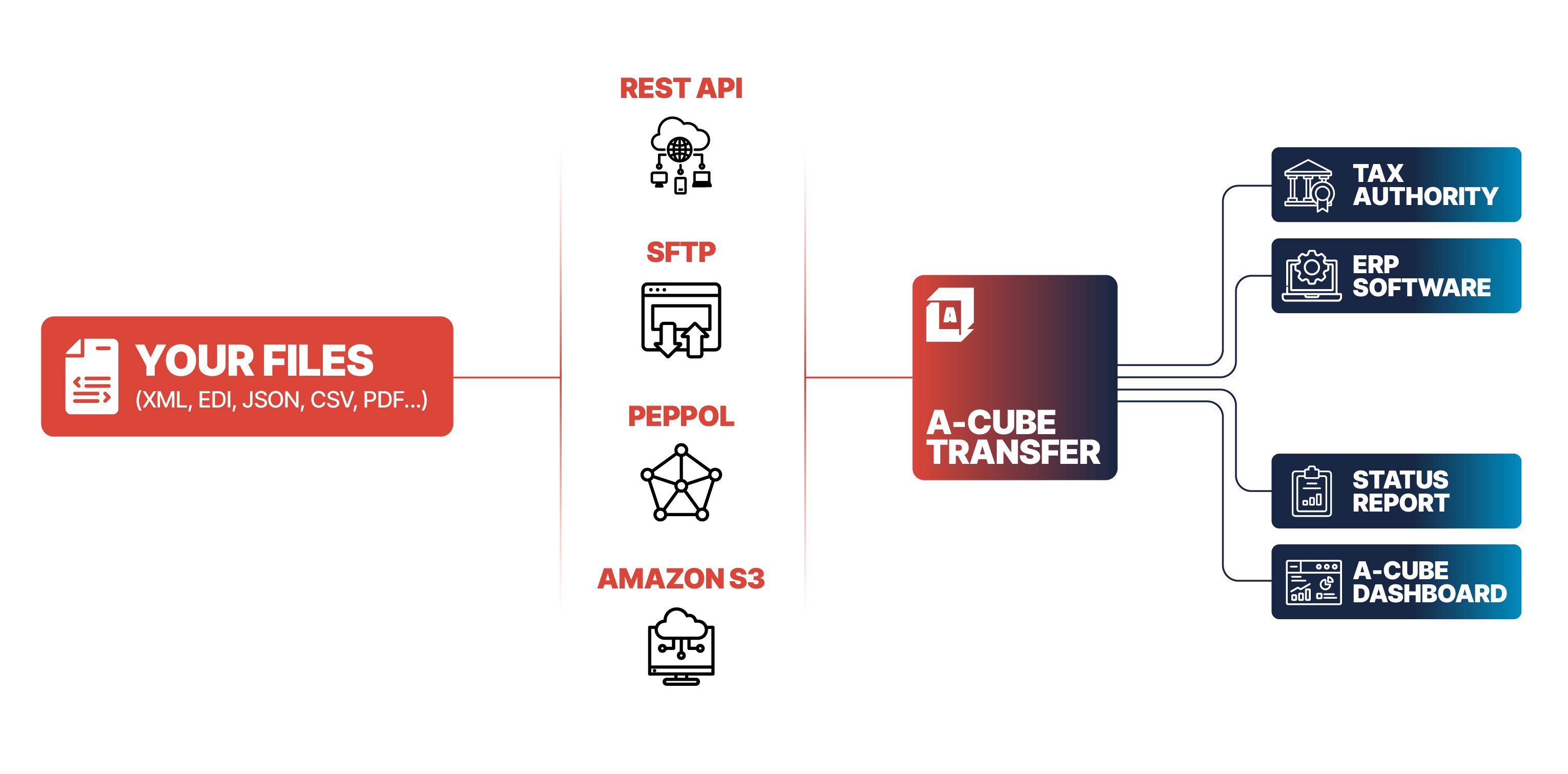
A-Cube Transfer is a technology capable of handling and transforming any file format. Here's how it works:
The ERP or accounting software generates a file of any format (CSV, Excel, EDI, XML, JSON, etc.). The file contains a set of information useful for building electronic invoices.
These files are uploaded to the selected channel, which can be SFTP, AS2, Amazon S3 or REST API. The import process will start automatically as soon as new files are received.
The uploaded files will be divided into individual documents and transformed one by one into XML electronic invoices, based on the transformation model agreed with the Client.
Every input document will be transformed into the required schema. The platform A-Cube validates the document and manages communication with the correct government channel.
The Customer will receive a report of the whole process.
Whatever you want
A wide range of file types are supported:
ZIP archives containing files in CSV, JSON, or XML format
CSV files with one or more documents
JSON or XML files ready for transmission
P7M files digitally signed, containing any of the formats listed above
As you wish
The file management process is fully configurable: for example, you can decide to upload PDF files and use them as attachments to an electronic invoice in XML format.
If instead you upload a document already ready to use, for example in XML or JSON format, it will not require any transformation. The document will be routed through the APIs and sent to the tax authority.
Wherever you want
Upload a document by exporting it directly from your ERP or cloud service and transmit it to A-Cube Transfer quickly and flexibly — choose between SFTP, Amazon S3, AS2, or REST API. Simply tell us where it is, and we'll take care of the rest.
Whenever you like
A-Cube transmits the document to the tax authority as well as back to your ERP to continue the workflow on your own terms. Monitor its status at any time via our dashboard or receive a detailed report by email.
HOW IT WORKS
Upload, convert, send
A-Cube Transfer is a technology capable of handling and transforming any file format. Here's how it works:
The ERP or accounting software generates a file of any format (CSV, Excel, EDI, XML, JSON, etc.). The file contains a set of information useful for building electronic invoices.
These files are uploaded to the selected channel, which can be SFTP, AS2, Amazon S3 or REST API. The import process will start automatically as soon as new files are received.
The uploaded files will be divided into individual documents and transformed one by one into XML electronic invoices, based on the transformation model agreed with the Client.
Every input document will be transformed into the required schema. The platform A-Cube validates the document and manages communication with the correct government channel.
The Customer will receive a report of the whole process.
Whatever you want
A wide range of file types are supported:
ZIP archives containing files in CSV, JSON, or XML format
CSV files with one or more documents
JSON or XML files ready for transmission
P7M files digitally signed, containing any of the formats listed above
As you wish
The file management process is fully configurable: for example, you can decide to upload PDF files and use them as attachments to an electronic invoice in XML format.
If instead you upload a document already ready to use, for example in XML or JSON format, it will not require any transformation. The document will be routed through the APIs and sent to the tax authority.
Wherever you want
Upload a document by exporting it directly from your ERP or cloud service and transmit it to A-Cube Transfer quickly and flexibly — choose between SFTP, Amazon S3, AS2, or REST API. Simply tell us where it is, and we'll take care of the rest.
Whenever you like
A-Cube transmits the document to the tax authority as well as back to your ERP to continue the workflow on your own terms. Monitor its status at any time via our dashboard or receive a detailed report by email.
FEATURES
Why A-Cube?
Complete documentation. From the first token to production.
Everything you need to integrate A-Cube's APIs is on our developer portal: JWT authentication, full references for every endpoint, guides to document flows and specifications in OpenAPI format. The documentation is organised by reference country and covers the entire platform: e-invoicing, Open Banking, archiving, preconfigured connectors such as Transfer and Stripe app. Free Sandbox included, with a control dashboard to test the integration without touching real data. You can share your feedback about our APIs directly from the dashboard.
Not only APIs: our customer support team is here to help you!
The customer support of A-Cube is structured to support you continuously during the integration and operation of the APIs in complex contexts. It includes support during onboarding, with the involvement of dedicated integration managers, and technical assistance in production through structured channels and defined SLAs. Request management quickly resolves application and compliance issues, with specific expertise in tax flows and integrations with third-party systems, reducing implementation times and ensuring operational continuity even in the event of regulatory changes or variations in integrated systems.
FEATURES
Why A-Cube?
Complete documentation. From the first token to production.
Everything you need to integrate A-Cube's APIs is on our developer portal: JWT authentication, full references for every endpoint, guides to document flows and specifications in OpenAPI format. The documentation is organised by reference country and covers the entire platform: e-invoicing, Open Banking, archiving, preconfigured connectors such as Transfer and Stripe app. Free Sandbox included, with a control dashboard to test the integration without touching real data. You can share your feedback about our APIs directly from the dashboard.
Not only APIs: our customer support team is here to help you!
The customer support of A-Cube is structured to support you continuously during the integration and operation of the APIs in complex contexts. It includes support during onboarding, with the involvement of dedicated integration managers, and technical assistance in production through structured channels and defined SLAs. Request management quickly resolves application and compliance issues, with specific expertise in tax flows and integrations with third-party systems, reducing implementation times and ensuring operational continuity even in the event of regulatory changes or variations in integrated systems.
Dashboard
A-Cube API monitoring dashboard
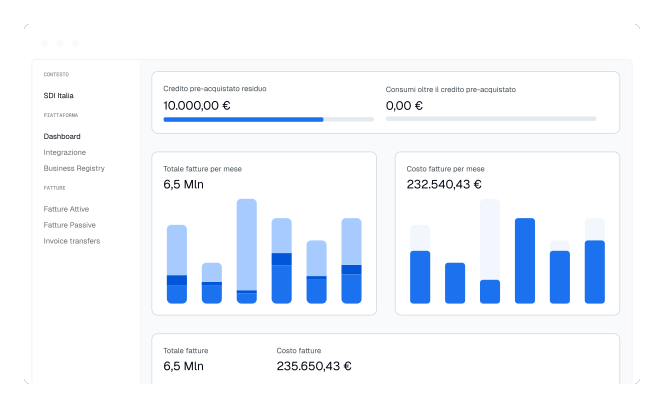
Monitor usage and statistics. Manage inbound and outbound document flows with advanced filters. Thanks to webhooks, you can decide how the A-Cube platform should interact with your systems and how it should behave when you manage your clients' accounts.
Dashboard
A-Cube API monitoring dashboard
Monitor usage and statistics. Manage inbound and outbound document flows with advanced filters. Thanks to webhooks, you can decide how the A-Cube platform should interact with your systems and how it should behave when you manage your clients' accounts.