API
Bulk download from the Tax Drawer: the new A-Cube API
Consulting electronic invoices in the Tax Drawer is a mandatory step for companies, professionals and tax advisers. However, when the volume of documents grows and time runs short, manual management quickly turns into a bottleneck. Between repetitive downloads, multiple logins and the risk of errors, even a simple operation such as downloading invoices can slow down the entire operational flow.
Taking these risks into account, automation is anything but a mere convenience: it is a strategic lever that saves us time, reduces the margin for error and integrates accounting data within company systems. In this article we will see which API can be integrated to achieve these results.
From the Tax Drawer to the management system: how to automate the data flow
The Tax Drawer is the service that allows consultation and management of one’s tax information. Companies, self-employed professionals and private taxpayers can access the Tax Drawer on the website of the Italian Revenue Agency using their SPID credentials (Public Digital Identity System), CIE (electronic identity card) or CNS (national services card).
Besides personal data, in the case of taxpayers with a VAT number the Tax Drawer also contains information relating to their business and stores issued and received electronic invoices. Since 4 June 2021, it has also been possible to request the retrieval and retention for 15 years of all electronic invoices issued and received since 1 January 2019.
Electronic invoices stored in the Tax Drawer can be viewed directly online or downloaded manually. This latter process can be lengthy and lead to wasted time in the management of day-to-day operations.
How would the manual procedure from the Tax Drawer work?
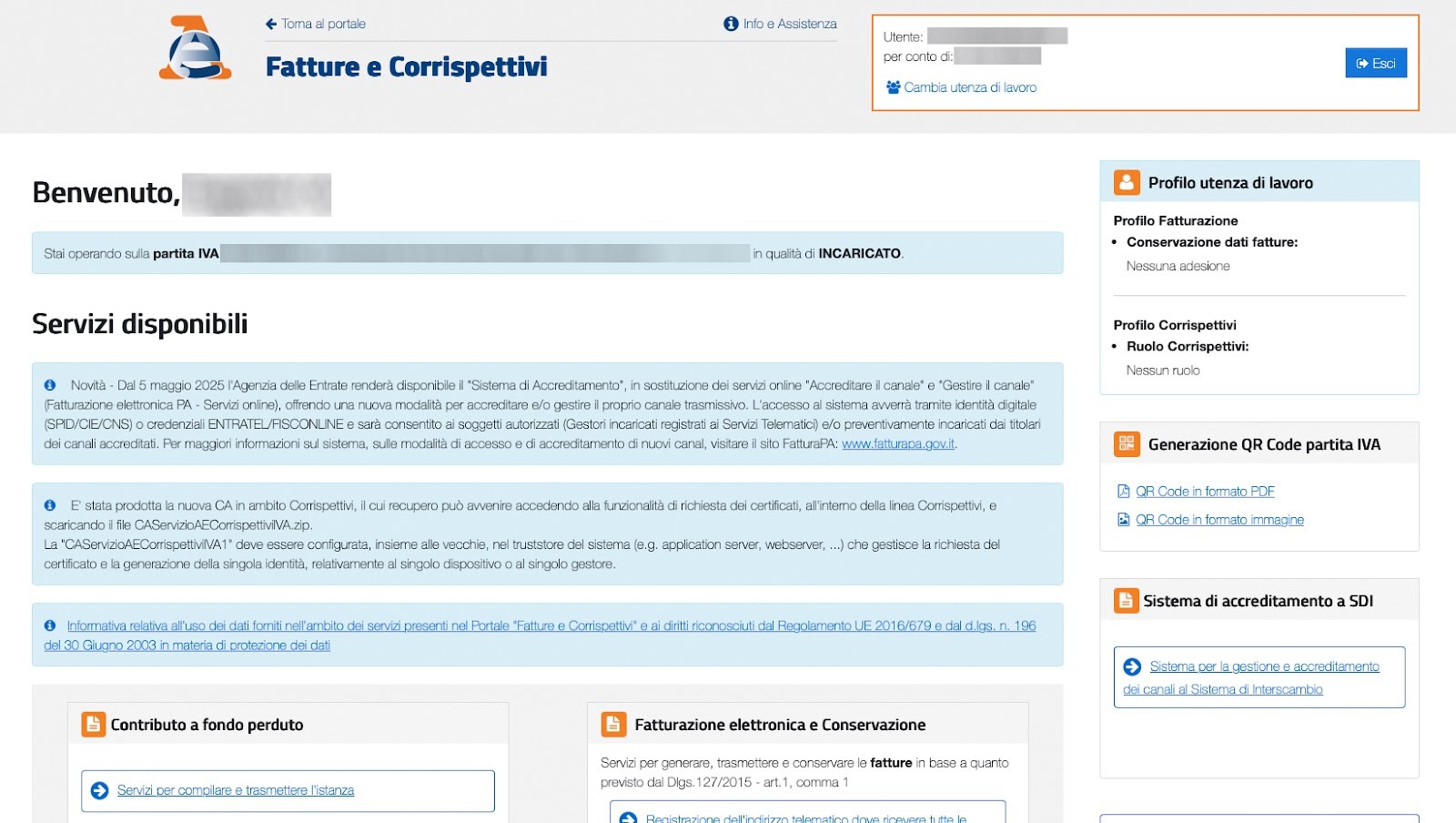
After logging in with SPID on the Invoices and Receipts portal of the Italian Revenue Agency, you need to choose, from the available services, Consultations and bulk downloads.
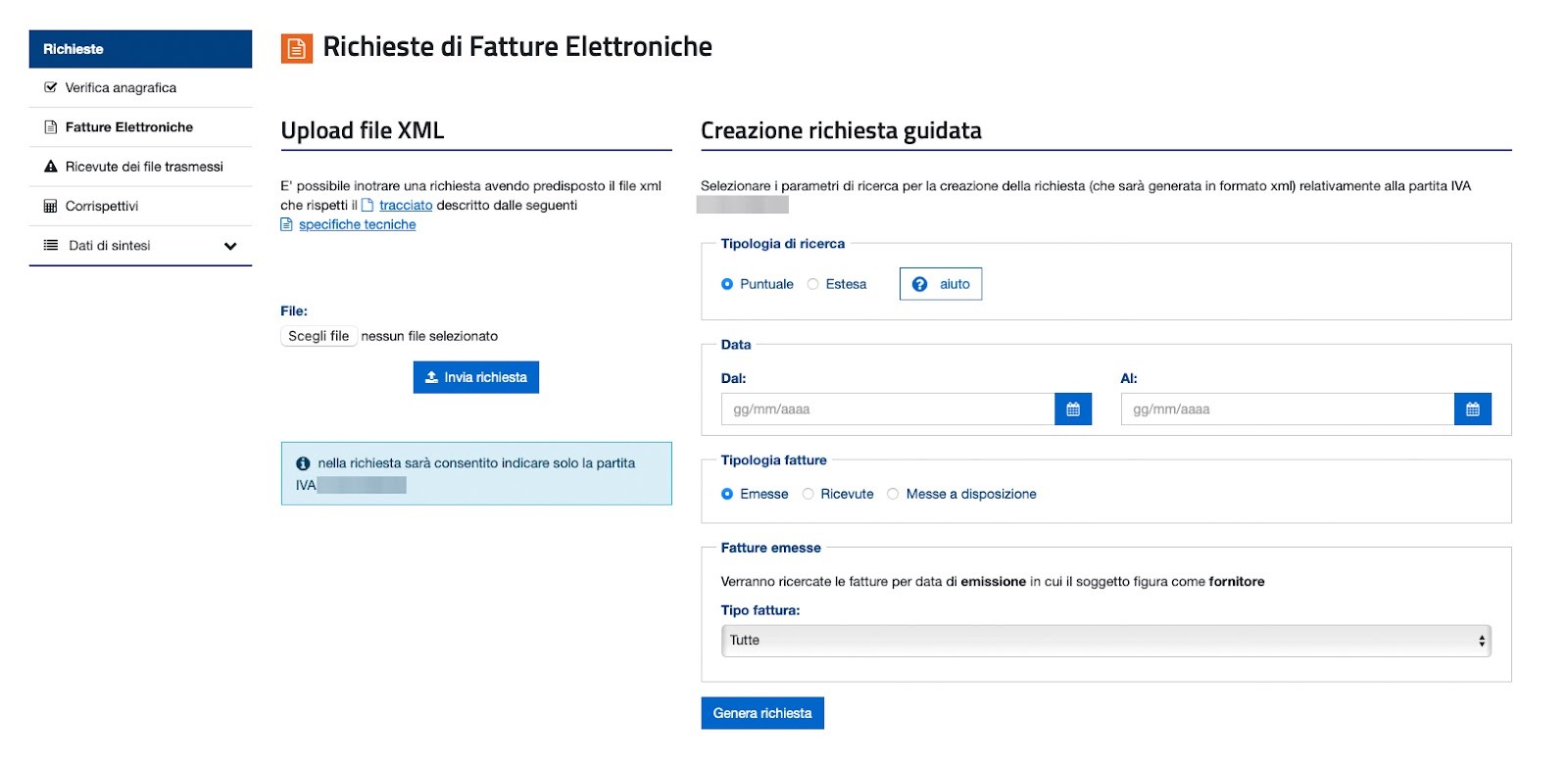
At this point, a request must be made from the corresponding item and then the search type must be filled in, together with the reference dates for the invoices to be downloaded and the type of invoice issued or received. The request procedure must therefore be repeated several times if you want to download both types or work on different date ranges.
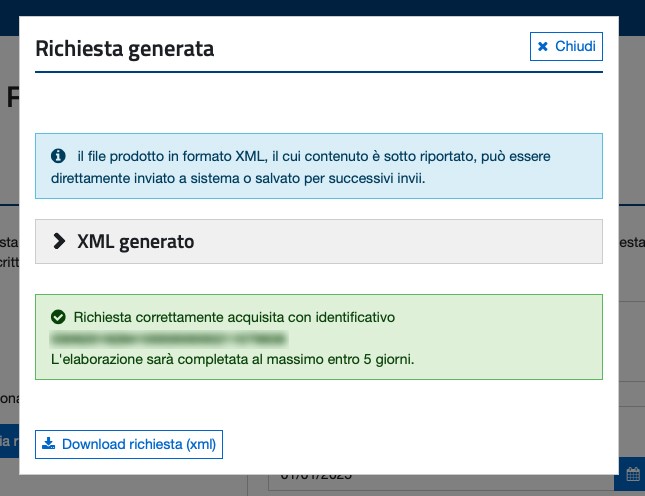
The request made will be processed by the Italian Revenue Agency within 5 calendar days and the file will then be available in the Responses section of the same portal.
Companies therefore find themselves having to download the files from the Tax Drawer and upload them manually to ERPs and management systems that do not communicate with each other. Tax consultancy firms, which manage the data of multiple clients at once, often need to download large quantities of documents from different Tax Drawers, each with specific credentials, within short timeframes.
To overcome this series of issues and speed up the work of company and consultancy teams, we developed the Bulk Download from the Tax Drawer API.
Bulk Download from the Tax Drawer API: what is it for?
The Bulk Download from the Tax Drawer API is programmed to download daily the electronic invoices sent and issued without having to visit the Italian Revenue Agency website. The service makes it possible to automate the operation and integrate it within the workflow already adopted by the company or professional practice, such as administrative software or cash flow management software. Everything happens on a scheduled basis and without human intervention. Automation reduces the chances of making mistakes and ensures the completeness of the downloaded data. The API also allows:
access via an appointed person and centralised management from a single interface
integration of external systems such as ERP, CRM and accounting software, making the data immediately usable.
a clear, real-time view of the documents available, useful for forecasts and internal checks.
In this way, the API transforms a complex, repetitive operational activity into a smooth, continuous process that is easy to integrate into the company information system.
Downloading data from the Tax Drawer automatically, integrated and at scale
The API works at scale: it can be used to download a few files or tens of thousands of electronic invoices issued or received. In both cases, the data will be periodically prepared and made available to the software, which will then acquire them to process them or share them with another software package.
In addition to scheduling invoice downloads, it is possible to check their progress status or cancel the schedule. Electronic invoices can be downloaded in PDF, XML, Json or CSV format. To learn more about how it works, you can read all the information on the dedicated page.
Benefits of the A-Cube API for accountants and consultancy firms
For accountants, Bulk Download from the Tax Drawer can represent a concrete breakthrough in tax data management. A-Cube's API fully automates the download of electronic invoices from the Tax Drawer, eliminating repetitive manual operations and allowing centralised access to information for multiple clients, even with different credentials, without any errors whatsoever.
For accountants and tax advisers to use the API, the client must grant them the assignment to access their Tax Drawer. Once this step is complete, automatic document download can be set up. If the end customer, whether a company or a private individual, is the one using the API, they should grant the assignment to A-Cube. To do this, you can follow the guide to start the company onboarding process and set up the login credentials for the "Tax Drawer" portal. Once the delegation has been granted, A-Cube also takes care of notifying the user (or the appointed professional) when the login passwords for the AdE portal are about to expire, every 90 days. Renewal can be managed in just a few clicks directly from the link received by e-mail, without needing to access the Italian Revenue Agency portal.
Automate file downloads from the Tax Drawer
Thanks to the Bulk Download from the Tax Drawer API, activities related to collecting and managing electronic invoices become faster, safer and more integrated. To start using it, no setup cost is required. It is enough to activate a VAT registration, set up the delegations and start the automatic flow. Find out more about our Bulk Download from the Tax Drawer API or consult the technical documentation or contact us at info@acubeapi.com.